
For newer interior designers
Designer Fee Calculator for interior design fees.
A pricing calculator for solo designers building an interior design business who need a confident fee, clear deposit, and proposal-ready language before the client asks, "Can you send the quote?"
Made for the exact moment when the project sounds exciting, but the number still feels risky.
Undercharging one project costs more than this calculator.
If your fee is based on what sounds fair, the quiet work is probably missing: revisions, sourcing, admin, overhead, client communication, and the risk that a simple room becomes a bigger job.
Estimate design, sourcing, revision, presentation, and admin time before the client sees a price.
Turn your fee into a clean deposit, scope explanation, and client-facing paragraph.
Use ready wording for what is included and how extra requests become paid changes.
Who it is for
Made for designers at the “I have clients, but pricing still scares me” stage.
You are taking consultations, sending proposals, and need your pricing to stop feeling made up.
You want your fee to cover the real work, not just the visible design hours.
You need simple, repeatable pricing for room packages, refreshes, and design days.
A pricing workflow, not another blank spreadsheet.
The workbook is structured around how a new design business actually quotes: set assumptions once, test the project, then leave with numbers and language you can use.
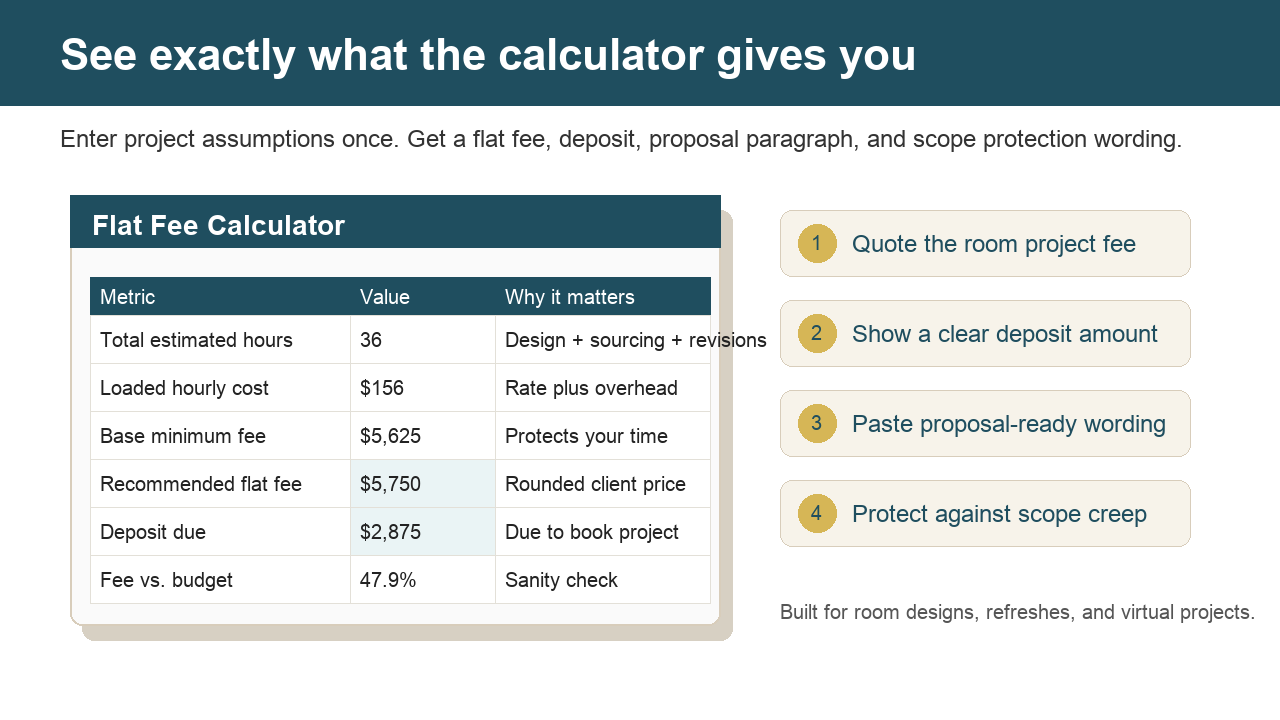
Yellow cells make the assumptions obvious: hours, rate, overhead, risk, margin, budget, and deposit.
The calculator rounds to a clean client-facing fee instead of an awkward formula result.
Use the generated fee explanation, scope language, and change-order wording instead of writing from scratch.
Compare the design fee against furnishing budget so the quote does not feel detached from project size.
Why it works
The workbook turns pricing from a feeling into a repeatable decision.
Most undercharging happens because the fee is decided too late, when you are already emotionally attached to winning the project. The calculator slows the decision down just enough to price the hidden work before you write the proposal.
You start from phases, hours, overhead, margin, and risk instead of what sounds acceptable.
The output gives you a fee, deposit, and explanation so you are not inventing language under pressure.
The script helps you name what is included and what becomes paid additional work.
Buyer fit
Best for designers who sell packages, rooms, and consults, not billable-hour chaos.
Use it when you quote
- Paid consultations
- Room refreshes
- Full-room design packages
- Virtual room design
- Designer-for-a-day offers
It helps you decide
- What fee protects your time
- What deposit to ask for
- When the budget and scope do not match
- What to say about revisions and extra work
It is not
- A legal contract
- A coaching program
- A bookkeeping system
- A substitute for your judgment
Studio-grade quoting
Built for the part of design work clients never see.
Good design proposals feel calm because the math underneath them is settled. This workbook gives you a pricing ritual: estimate the labor, include the overhead, protect the margin, then turn the result into language you can actually paste into a proposal.
Use it before consult calls, after a site visit, or when a room refresh starts to become a full-service project.
Instant download
What the $29 package includes
Inputs, flat-fee calculator, scope builder, proposal copy, and change-order script tabs.
Recommended flat fee, deposit amount, fee explanation, and scope language from one input sheet.
Change hours, target rate, overhead, margin, risk buffer, furnishing budget, markup, and deposit.
Pricing Confidence Checklist and client fee presentation script so you know what to say when you send the number.
Checkout runs through Gumroad.
Open the workbook and read-me.
Enter your assumptions and copy the proposal language.
Price
Designer Fee Calculator$29 digital pricing workbook for new designers quoting consults, room packages, virtual design, and flat-fee projects.
- One-time payment
- Instant Excel workbook download
- Digital product delivered through Gumroad
- Includes the Pricing Confidence Checklist and client fee script
- Buy before one proposal, reuse whenever a similar project comes in
- Works for consultations, room refreshes, full-room design, virtual design, and designer-for-a-day
- Refund or fix if the file is broken or unusable within 7 days
- Use internally only; do not resell, share, or redistribute the workbook
Secure checkout is handled through the dedicated calculator product listing on Gumroad for the $29 Interior Designer Flat-Fee Calculator workbook only. This checkout is for the $29 Designer Fee Calculator workbook only, delivered instantly after purchase.
Questions before buying: hello@designerfeecalculator.com. Purchase support: support@designerfeecalculator.com or the Gumroad receipt/contact option.
This is a digital product. Refunds are not automatic after download, but broken or unusable files will be fixed or refunded when reported within 7 days.
Outputs are estimates based on your inputs. Results vary by project, market, client, scope, and your judgment; this is not legal, accounting, tax, financial, or business coaching advice.
Product name
Designer Fee Calculator is the interior design pricing workbook.
Designer Fee Calculator is also known as the Interior Designer Flat-Fee Calculator. The workbook helps interior designers price consultations, room packages, e-design, designer-for-a-day offers, deposits, scope boundaries, and flat-fee proposals.
Worked example
Example: pricing a full-room project
This is an illustrative example of the kind of before-and-after pricing check the workbook is built to support. It is not a customer result or testimonial.
Example scenario, not a testimonial
Full-room design quoteA designer estimated 36 hours for a full-room project, then added overhead, margin, risk buffer, and a 50% deposit. The sample calculator output produced an $8,750 flat fee and a $4,375 deposit, with proposal language explaining the scope and change-order boundary.
Free checklist
The 7 Pricing Mistakes New Designers Make
Get the calm, one-page checklist before you quote the next room project.
Questions before you quote from it
Will this fit how I price?
Yes if you need a structured starting point for consultations, room packages, virtual design, design days, or flat-fee room projects. You can edit the assumptions for hours, target rate, overhead, margin, risk buffer, furnishing budget, markup, and deposit.
Is this a coaching program?
No. It is a practical Excel pricing workbook for one moment: deciding what to charge before you send a room-project proposal.
Does it protect me legally from scope creep?
No. It includes scope and change-order wording, but it is not legal advice. Use the copy as a starting point and adjust it for your contract and market.
Are the calculator outputs guaranteed?
No. The workbook produces estimates from the assumptions you enter. Results vary by project, market, client, scope, and your own business judgment. It does not guarantee profitability, client acceptance, or a correct price for every project.
Does it work in Google Sheets or Numbers?
Excel is the supported format. Do not assume other spreadsheet apps will preserve every formula until you test your copy.
What happens after I buy?
Gumroad delivers the product zip immediately. Inside are the Excel workbook and a short read-me so you can open the file, edit the inputs, and use the proposal language.
Why is there an example preview?
The example shows the type of output the workbook creates without giving away the editable calculator. The full product is the downloadable Excel workbook with supported tabs, formulas, and instructions.
Pricing resources
Start with the pricing question in front of you.
These guides connect the workbook to the searches newer designers actually make before quoting a client.
Compare hourly, flat fee, consultation, room package, and e-design pricing.
Pricing calculator inputsSee the inputs that keep a quote grounded in real project work.
Full-room quote calculatorCheck the fee, deposit, scope boundary, and proposal language before a room quote goes out.
Flat fee calculatorBuild a flat fee from hours, overhead, margin, deposits, and risk.
Proposal pricing languageExplain flat fees, deposits, payment timing, and added work clearly.
Before the next proposal
Check the common pricing mistakes first.
The free checklist is built for the same moment as the workbook: after the consult call, before the fee goes to the client.